Give returns and damaged stock the right record.
A customer return, a return to a supplier, and damaged stock are different events. Choose the right type so the product movement and any financial effect tell the same story.
Which return type matches what happened?
Use Sales return for an item coming back from a posted sale, Purchase return for goods going back against a recorded purchase, and Damaged stock when removing damaged inventory. The return form links eligible products to the original posted transaction where one is required and records a reason.
Step by step
- 01
Find the original transaction
For sales or purchase returns, choose the original posted bill or purchase and verify the product and eligible quantity. Damaged-stock recording does not require a customer sale to justify the quantity change.
- 02
Choose quantity and a reason
Select the product and quantity being returned or written out. Explain what happened. Check whether goods coming back are usable; a sales return adds quantity back, so damaged returned goods need the appropriate separate treatment.
- 03
Review credit and refund choices
A return changes the original transaction’s position. Where a linked contact has a refundable credit, the form can refund it or retain it on that account. A walk-in return has no saved contact ledger to hold a credit. Review the actual return summary before confirming.
- 04
Check stock and the contact record
Review Returns & Damage, the item’s movement history, and the customer or supplier account where applicable. Avoid entering an extra generic adjustment for units the return has already moved.
Three separate example events
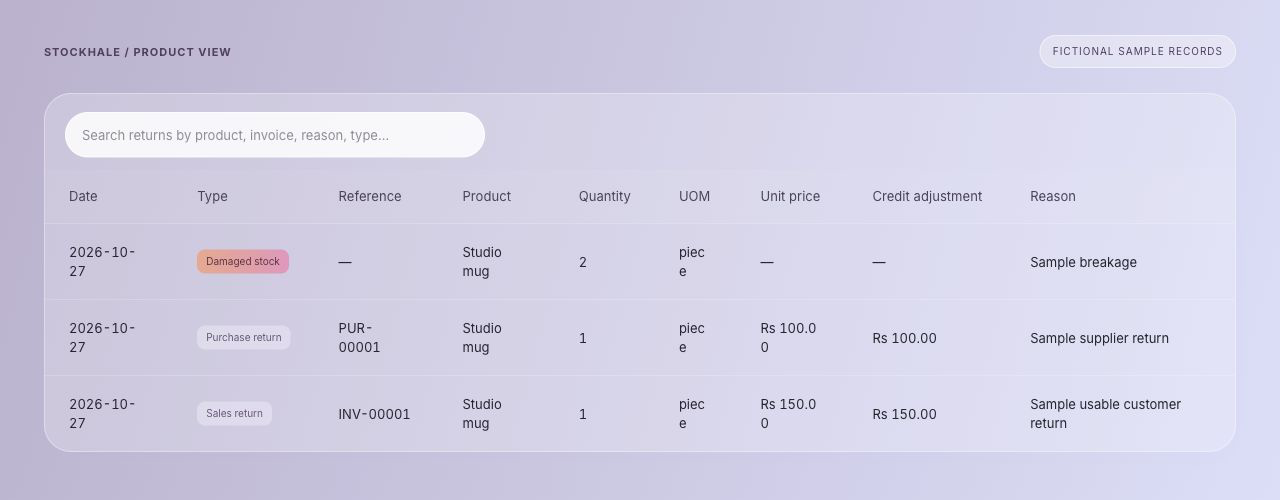
Each row is an independent illustrative case. Any refund or credit depends on the original transaction and its settlement.
| Event | Stock effect | Account consideration |
|---|---|---|
| One usable customer return | +1 piece | Review original sale and any customer credit/refund |
| One item returned to its supplier | −1 piece | Review original purchase and supplier credit |
| Two damaged items removed | −2 pieces | No customer refund created by damage alone |
See the product workflow
Check the details that matter.
- Use the original posted transaction for sales and purchase returns.
- Do not put unusable goods back into available stock without addressing their condition.
- Review refunds versus credit retained on the ledger.
- Avoid a second adjustment for units already changed by the return record.
A few useful distinctions.
Does damaged stock create a customer refund?
A damaged-stock record removes the specified inventory quantity. It does not by itself represent a customer sale return or create a customer refund.
Can I return more than was sold?
The form limits eligible return quantities against the original transaction and previous returns. Verify the original record rather than using a return to correct an unrelated stock difference.