Customer and supplier accounts, connected to your stock.
Keep what arrived, what sold, and what is still owed in the same retail workspace. StockHale connects purchases and bills with customer and supplier records, so you can follow each account beyond a single transaction.
What does a contact account tell you?
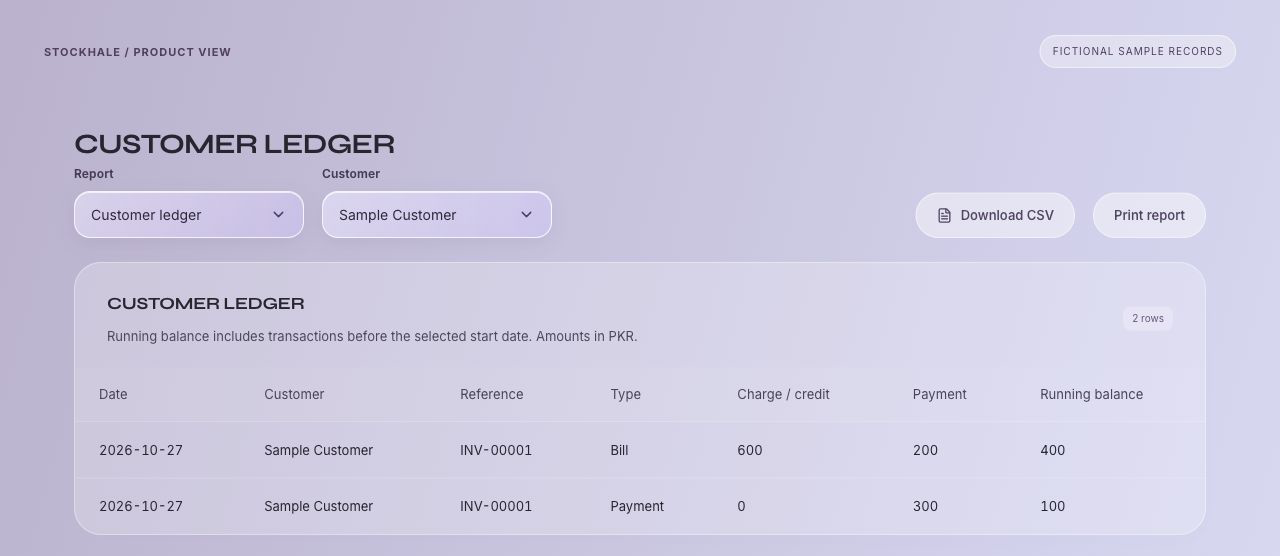
A customer or supplier account brings the contact’s transactions, payments, returns, credits, and running balance together. Use a bill to understand one transaction; use the contact ledger to understand the whole relationship. A remaining account balance can differ from the sum of open bills when there are unapplied credits or account-level settlements.
How the workflow fits together
- 01
Save the right contact
Create customers and suppliers before posting transactions that need an account history. Check that you select the existing contact rather than creating another record for the same business.
- 02
Record purchases and customer bills
Posted purchases add stock and record amounts still due to the supplier. Posted customer bills reduce stock and record the paid amount and remaining bill balance.
- 03
Follow later payments
Use Payments for customer collections and supplier settlements. Customer payments can be linked to the relevant bill. Supplier account payments reduce the whole supplier account; review the supplier payable balance when settling it.
- 04
Review the ledger and the bill
Open the customer or supplier details and review its ledger, transaction references, and balance. Check individual bill records when you need to trace a particular sale or purchase. Credits may require separate matching or review.
A customer bill and its remaining balance
Illustrative sample: one customer, one bill, no returns or other credits. Amounts are PKR.
| Event | Paid at this step | Remaining balance |
|---|---|---|
| Bill for 4 mugs at 150 each | 200 | 400 |
| Later customer collection | 300 | 100 |
| Final customer collection | 100 | 0 |
See the product workflow
Check the details that matter.
- Review the contact’s net balance alongside individual bill balances.
- Check whether a credit is applied to a bill or remains on the account.
- Record payments when money actually changes hands, with the correct date and method.
- Use the supplier’s whole-account payable balance when recording a supplier settlement.
A few useful distinctions.
Does a supplier payment always change the original purchase bill?
Account-level supplier payments reduce the supplier payable balance. Individual purchase bills remain available as transaction references, so the supplier’s total account balance and the original bill balance can differ.
Can this replace professional accounting advice?
These tools organize operational records. Confirm your business’s accounting, invoicing, and tax requirements with the appropriate professional.