Enter opening stock once, with a clear starting point.
Opening stock is the stock you already have when you begin recording your shop in StockHale. Choose a starting date, count the items, and decide which records represent existing stock and which represent purchases you are entering.
Should you enter a purchase or a stock adjustment?
Use a purchase when you are recording an actual supplier purchase, including its products, costs, and payment details. For existing stock whose purchase you are not entering, use a stock adjustment. Do not add an opening adjustment and then post a purchase for the same units. A stock adjustment changes quantity; it does not create a supplier bill or a payment.
Step by step
- 01
Choose a cutover date and count
Count stock at a clear starting point before recording new sales. List each product, unit, quantity, SKU, and the cost information you have. Keep uncounted items separate from counted items.
- 02
Create product records
In Inventory, add each product with its SKU, cost and selling prices, unit, and category. Check for an existing product before adding a duplicate. Confirm that boxes and individual pieces use the intended quantity unit.
- 03
Enter the stock through one route
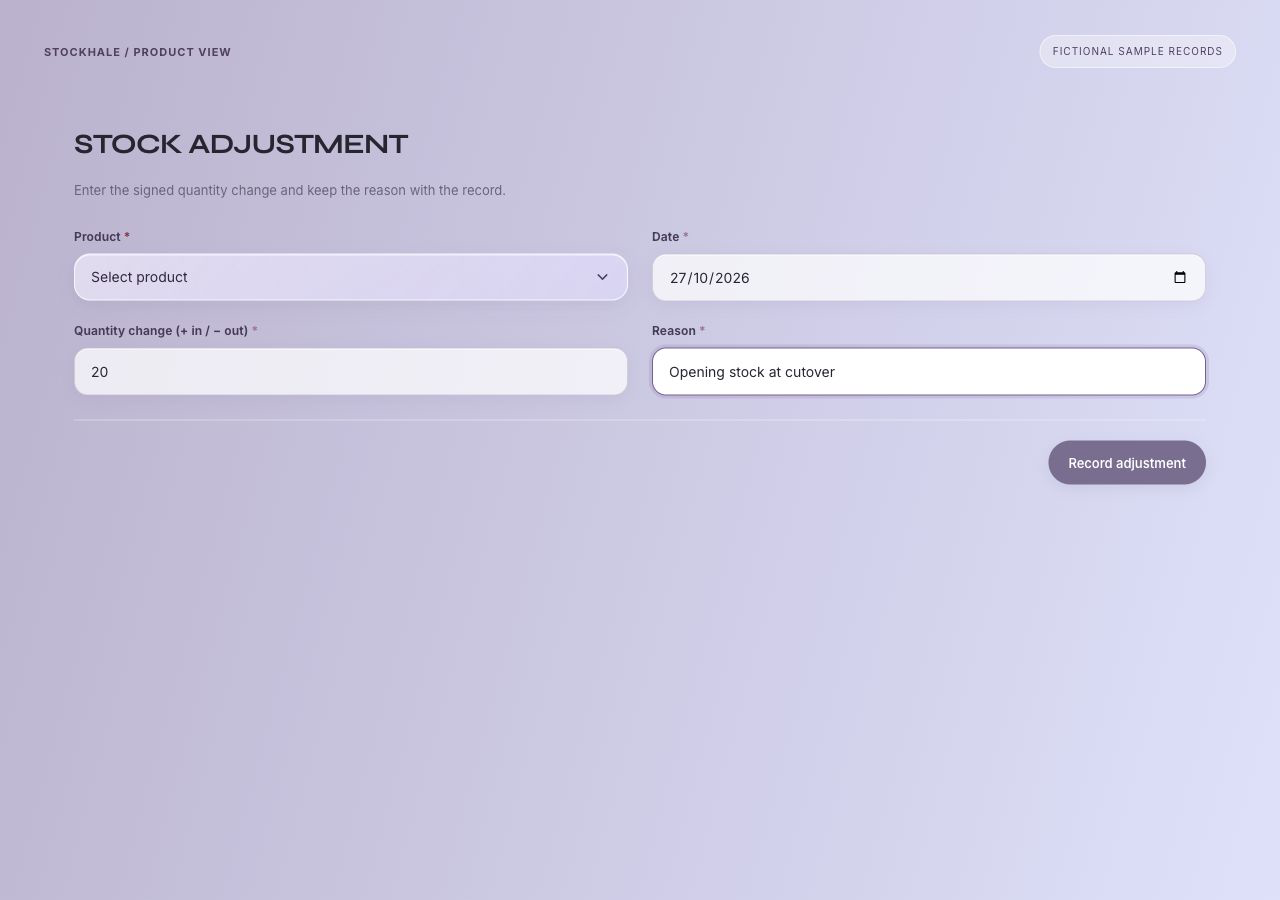
If you are entering the original supplier purchase, post that purchase. Otherwise open Inventory → Stock adjustment, select the product, enter a positive quantity change, choose the date, and add a reason such as ‘Opening stock at cutover’.
- 04
Check quantity and account effects
Open the product and review its current quantity and stock history. A purchase may create a supplier balance; an opening quantity adjustment alone does not. Keep starting supplier or customer account balances separate from stock quantity setup.
Twenty mugs already on the shelf
Illustrative sample: a new product has zero recorded stock. Its previous purchase will not be entered in StockHale.
| Step | Quantity change | Recorded stock |
|---|---|---|
| Product created without opening units | 0 | 0 |
| Opening-stock adjustment | +20 | 20 |
| Do not also post the old purchase | No second entry | 20 |
See the product workflow
Check the details that matter.
- Count the same physical unit only once.
- Check each product’s unit, starting quantity, and cost before entering it.
- Keep the count record and reason for the opening adjustment.
- Review supplier opening balances separately; stock quantity alone does not establish what you owe.
A few useful distinctions.
Does a stock adjustment record a purchase cost or payment?
No. The adjustment form records the quantity change, date, and reason. Product cost is maintained on the product record; supplier purchases and payments have their own workflows.
What if I entered the same opening units twice?
Review the purchase and adjustment history before making a correction. Identify the duplicated entry and use the appropriate correction workflow; do not remove a genuine purchase just to make the quantity look right.